Manga OCR guide · AI Translate Manga · Updated November 15, 2026
Manga SFX & Vertical Sound Effects: Inpainting Erasure vs Plain OCR
Direct answer: Plain OCR extracts Japanese text into a separate transcript without touching the page, which leaves vertical sound effects (SFX) untranslated on the artwork. An image-inpainting translator like AI Translate Manga detects text, erases original characters, and typesets English or Simplified Chinese directly back into the page—however, large stylized SFX drawn over detailed backgrounds or screentones can still remain untranslated or alter fine artwork. Always test one SFX-heavy page using your 4 free trial pages (30 days) before batching a chapter.
Real saved comparison: large stylized SFX in the bottom panel
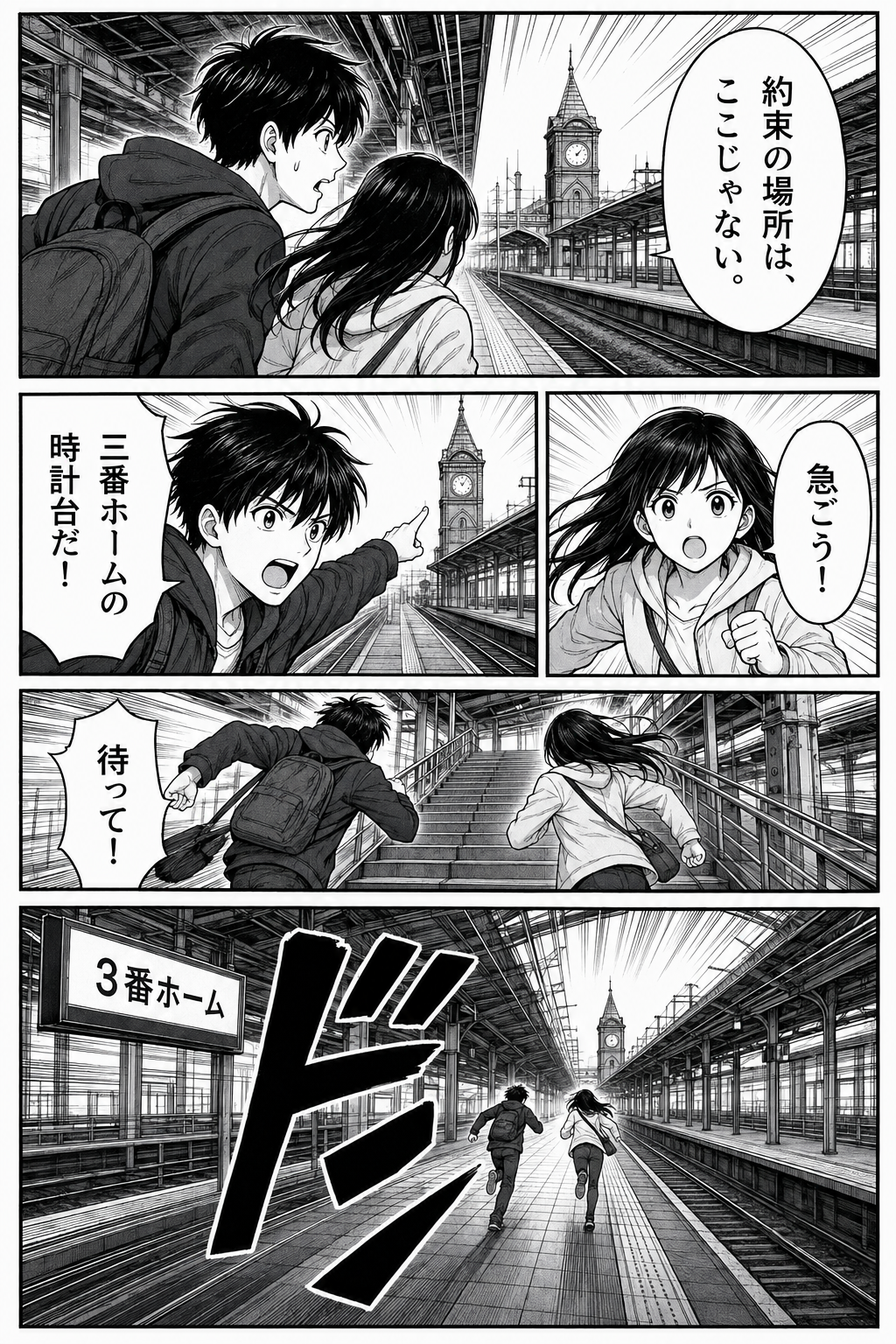
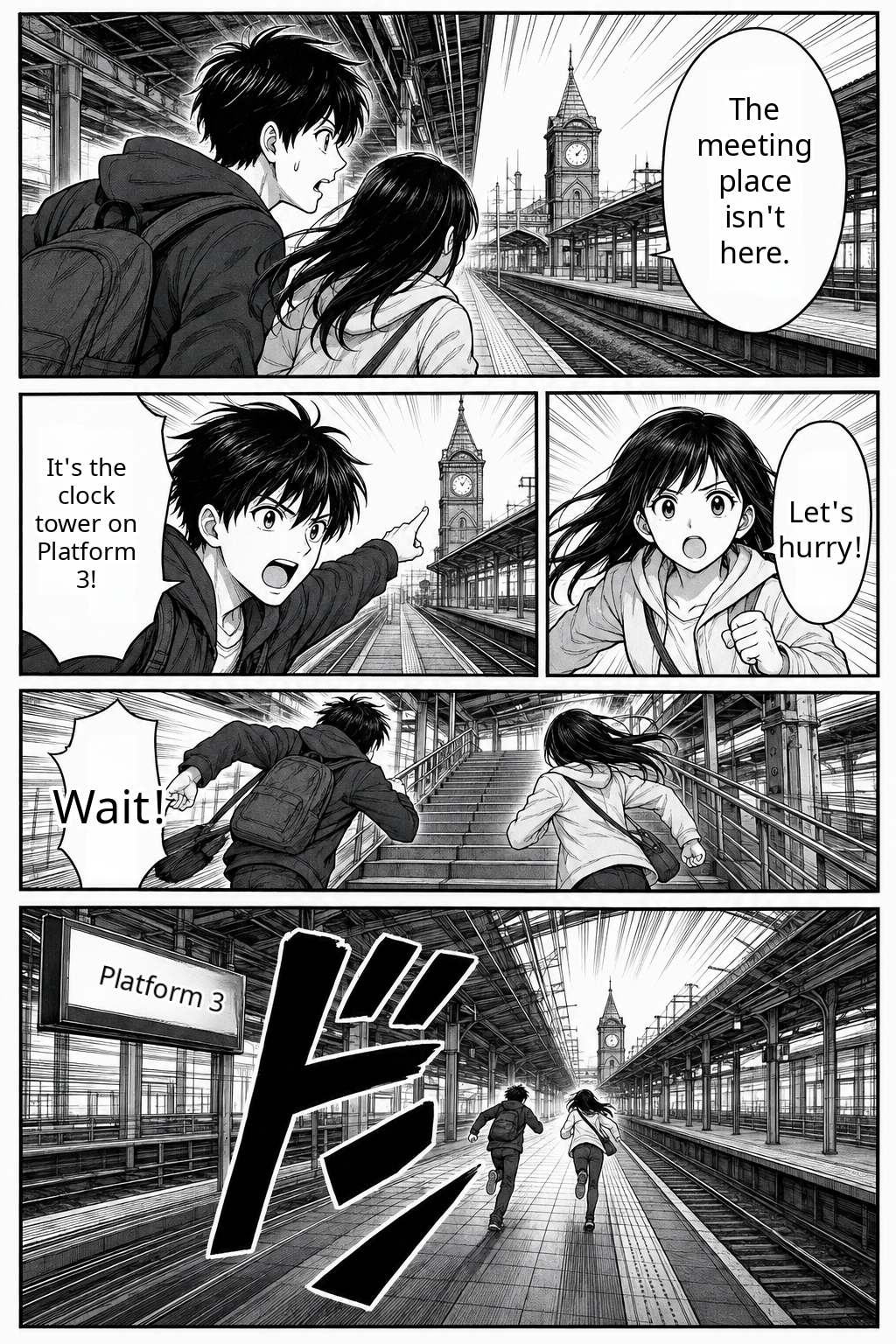
Vertical SFX erasure & inpainting vs plain OCR
| Dimension | AI Inpainting + Typesetting (AI Translate Manga) | Plain OCR / Text Overlay |
|---|---|---|
| Visual output | Erases Japanese text and places translated English or Simplified Chinese inside the flattened PNG page. | Outputs raw text in a sidebar, popup, or floating box; original Japanese characters stay visible underneath. |
| Vertical SFX handling | Works best on clean-contrast SFX; intricate brush strokes or dense screentones may remain untranslated or smudge slightly. | Frequently skips stylized brush SFX altogether or misreads decorative strokes as unrelated kanji. |
| Artwork preservation | Removes text inside bubbles cleanly, while erasing floating SFX over speed lines can alter local linework. | Zero alteration to underlying artwork, since nothing is erased or repainted. |
| Manual touch-ups | No built-in bubble or layer editor; keep your original file if you plan to redraw SFX in Photoshop/CSP later. | Easy to copy recognized text for manual translation, but requires manual redrawing if you want clean pages. |
Practical checklist before translating an action chapter
- Use crisp source files: Upload clean PNG or JPG pages (up to 5 MB / 20 MP) instead of compressed social screenshots; jagged compression artifacts hurt both vertical SFX detection and inpainting.
- Review 1 action spread first: Open the upload tool, translate one page with vertical SFX and speed lines, and inspect it side by side with the original.
- Know when to keep originals: Because output is a flattened PNG or ZIP (and no separate OCR transcript is exported), keep your original raw pages if you need human lettering or layered edits for publication. See overlapping text troubleshooting for more layout checks.
Frequently asked questions
Does AI Translate Manga always erase and translate hand-drawn sound effects (SFX)?
No. Dialogue inside standard speech bubbles is usually detected and replaced, while large stylized or hand-drawn SFX spanning detailed artwork or screentones may remain untranslated, be partially skipped, or alter nearby background lines when erased.
What is the difference between plain OCR and image-inpainting manga translation?
Plain OCR only extracts recognized text into a separate copyable box and leaves the Japanese artwork untouched. An image-inpainting manga translator erases the original characters on the image and places translated text back into the panel, producing a single flattened PNG image instead of a separate text transcript.
Can I disable SFX erasure or manually edit the erased area here?
Not inside the current workspace. AI Translate Manga returns flattened PNG images (or a ZIP) with original/translated side-by-side viewing, without a per-bubble editor, PSD layer export, or an SFX-only toggle.
How can I test how a chapter handles vertical SFX before paying?
New Google accounts receive 4 free trial pages valid for 30 days. Upload one SFX-heavy Japanese page first and zoom in on the background lines and screentones before translating the rest of your chapter.